Leave Your Message

Why Choose a Computer Desk for Your Office?

Choosing the right Computer Desk can change how an office feels and functions each day. A suitable desk gives your monitor, keyboard, documents, and essential tools a defined place. It can also reduce visual clutter around your workspace. That matters during long periods of focused work. A stable surface supports better organization. A comfortable setup supports better habits.

Office furniture specialists often recommend considering desk height, legroom, monitor position, and cable control. These details are practical, not decorative. Your elbows should rest comfortably while typing. Your knees need clear space beneath the desktop. A rear cable tray can prevent wires from brushing against your feet. Even a small drawer may keep chargers and notebooks within reach. The right measurements depend on your body and daily tasks.

Still, no Computer Desk fixes every office problem. I have seen attractive desks become uncomfortable because their surfaces were too shallow. Some affordable models also wobble when users write or move equipment. That experience makes careful checking important. Look for strong materials, reliable construction, and a finish that suits frequent use. Consider whether the desk can support your monitor, lamp, and other devices safely. A showroom appearance can be misleading. Your daily routine is the real test.

This guide explores why a Computer Desk may be a practical office investment. It considers comfort, productivity, storage, durability, and workspace appearance. It also acknowledges a simple truth: the best desk is not identical for everyone. Your work style should lead the decision.

Why Choose a Computer Desk for Your Office?

Definition and Purpose of a Computer Desk

A computer desk is a work surface designed for a monitor, keyboard, mouse, and related office tools. Its main purpose is to organize equipment while supporting comfortable, focused work. Unlike a dining table, it often provides cable openings, storage, and a suitable height for office tasks. The design keeps the screen stable and leaves space for documents or a notebook. Small details matter.

From practical office setup experience, desk depth strongly affects daily comfort. A depth of about 60 to 75 centimeters usually gives the monitor enough distance from the eyes. The keyboard should sit near the front edge, allowing relaxed shoulders and supported wrists. A sturdy frame also prevents distracting movement during typing. Cable management reduces clutter around the feet and makes cleaning easier.

I once chose a desk that looked efficient but had a narrow working surface. The monitor fit, yet my notebook had nowhere to go. That mistake changed how I assess office furniture. I now measure the room, chair clearance, and equipment before choosing a desk. Adjustable height can support different users, but it does not automatically create good posture. Users still need to position the screen and chair carefully. A computer desk should serve real working habits, not only appear attractive in a product photograph.


Key Features That Support Office Work

Why Choose a Computer Desk for Your Office?

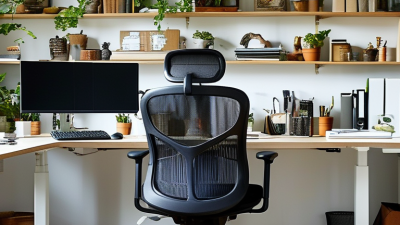
A well-designed computer desk supports posture, focus, and efficient daily work. In my experience, desk height affects comfort more than expected. A suitable surface lets your elbows rest near a right angle while typing. Keep shoulders relaxed. An adjustable frame can help different users share one workspace. A spacious desktop should hold a monitor, keyboard, notebook, and water bottle without feeling crowded. Rounded edges also reduce pressure on forearms during long tasks.

Cable management is another practical feature. Built-in openings or rear channels keep power cords away from your feet and cleaning tools. A stable frame matters too, especially when a monitor arm or printer adds weight. Check the stated load capacity before purchasing. Drawers or shelves can store documents, headphones, and chargers, but they should not reduce legroom. A desk that looks efficient may feel cramped underneath.

Monitor height deserves careful attention. The top of the screen should sit near eye level, reducing repeated neck bending. A matte, easy-to-clean surface can limit glare and support regular maintenance. I once chose a desk with attractive storage but ignored knee clearance; that mistake made afternoon work uncomfortable. The lesson is simple, though not perfect: measure your chair, equipment, and available room together. Even a small gap behind the desk can improve ventilation and make cable checks easier.

Why Choose a Computer Desk for Your Office? - Key Features That Support Office Work
Key Feature Practical Specification How It Supports Office Work Selection Consideration
Spacious Work Surface Approximately 1,200–1,600 mm wide and 600–800 mm deep Provides room for a monitor or laptop, keyboard, mouse, documents, and everyday office supplies without excessive crowding. Choose the width according to the number of screens and the available office space.
Suitable Desk Height Fixed desks commonly measure about 720–760 mm high; adjustable models may cover a wider range. Helps users position the keyboard and mouse at a comfortable working level and supports a more neutral seated posture. Check the height of the chair, user, keyboard, and monitor together rather than evaluating the desk alone.
Sit-Stand Adjustment Many electric sit-stand desks provide approximately 650–1,250 mm of height adjustment. Allows users to alternate between sitting and standing during computer-based tasks, improving flexibility throughout the workday. Look for stable height adjustment, clear controls, and a lifting range appropriate for the intended users.
Legroom and Open Clearance An unobstructed area beneath the desktop with no central drawer or fixed crossbar Allows users to reposition their legs, move closer to the desk, and use an adjustable office chair more effectively. Confirm that supports, modesty panels, and storage units do not interfere with knees or foot movement.
Cable Management Integrated cable tray, rear cut-out, or grommet openings Keeps power and data cables organized, reduces visual clutter, and helps prevent cables from catching on chairs or feet. Check the size and position of cable openings against the equipment and power outlets being used.
Monitor-Friendly Depth A depth of approximately 600–800 mm provides useful placement space for a monitor and keyboard. Creates room to position the screen at a comfortable viewing distance while keeping the keyboard and mouse within easy reach. A monitor arm can free surface space, but the desktop must be strong enough for the clamp and equipment load.
Stable Construction Rigid frame, level-adjustment feet, and a desktop designed for the intended equipment load Reduces unwanted movement while typing, writing, joining video meetings, or adjusting a monitor. Test the desk at its highest setting if it is height-adjustable, because stability can change with desk height.
Durable, Easy-Care Surface Smooth, non-porous or sealed surface that can be cleaned with a soft cloth and mild cleaner Supports routine office use and makes it easier to remove dust, fingerprints, and common surface marks. Review the care instructions and avoid abrasive cleaners that may damage the finish.
Accessible Storage Options Optional drawers, shelves, or under-desk storage placed outside the main leg area Keeps frequently used documents and accessories nearby while preserving a clear primary work surface. Storage should not reduce legroom or prevent the user from sitting close enough to the desk.

How a Computer Desk Improves Organization

A computer desk can turn scattered office habits into visible routines. Its value is organization, not appearance. A 2023 Work Trend Index survey of 31,000 workers found that 68% lacked uninterrupted focus time. A desk with separate zones can reduce small decisions during busy hours. Keep the monitor in the center, documents on one side, and charging cables near a rear cable channel. Store daily tools within arm’s reach. Move rarely used items into a drawer or cabinet.

Research from the University of California, Irvine, found that workers needed about 23 minutes to return to a task after an interruption. A clear desktop cannot prevent every interruption, but it can shorten the recovery process. Label one drawer for active projects and another for supplies. Use a vertical stand for notebooks. Leave one small empty area. It gives unfinished work a temporary landing place without covering the whole surface.

The arrangement may need revision. A desk that looks organized can still force awkward reaching or hide important papers. Measure your real workflow for a week. Notice what repeatedly moves, disappears, or blocks your keyboard. Adjust from evidence, not showroom habits. A practical computer desk supports organization because each object receives a predictable place.

Factors to Consider When Choosing One

Why Choose a Computer Desk for Your Office?

A computer desk supports more than a monitor and keyboard. It shapes posture, movement, and daily concentration. The European Agency for Safety and Health at Work reported in ESENER 2019 that three in five workers experience musculoskeletal complaints. Desk design cannot solve every problem, but it can reduce avoidable strain.

When choosing one, measure the user and the room first. A height-adjustable surface should let your elbows rest near 90 degrees, with shoulders relaxed. Check the desk depth carefully. A 60–80 centimetre depth usually gives a monitor enough viewing distance, while leaving space for documents. The American National Standards Institute recommends considering adjustability, clearance, and neutral working postures in computer workstations. Stability matters too. A desk that shakes during typing quickly becomes irritating. Cable management also deserves attention, especially in shared offices. I once underestimated this detail. Loose cables made cleaning awkward and created needless visual clutter.

Tips: Test the desk before buying. Sit for ten minutes. Move the keyboard. Check your knees. Leave at least 75 centimetres behind the chair when possible. Choose matte surfaces to reduce reflected glare. A fixed-height desk may cost less, but it can fit nobody perfectly. That is an uncomfortable truth. For mixed users, adjustability usually deserves priority over decorative features.

Common Types and Suitable Office Settings

Why Choose a Computer Desk for Your Office?

Common Types and Suitable Office Settings

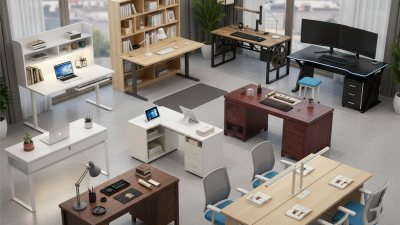
A computer desk does more than hold a monitor. It shapes posture, movement, storage, and daily concentration. In a small home office, a compact writing desk leaves room for a chair to move freely. Choose a surface at least 120 centimeters wide when one monitor, keyboard, and notebook share the space. Cable openings also prevent wires from hanging near your feet.

An L-shaped desk suits corner offices and employees who switch between screens, documents, and phone calls. It creates separate work zones without adding another table. In an open-plan office, a straight workstation usually fits better. A modest depth can protect walking space. Shared offices benefit from adjustable desks, especially when several people use the same station. Standing models may reduce long sitting periods, but they still need careful screen height and regular breaks.

I have worked at desks with attractive finishes and poor legroom. The result was daily discomfort, despite good equipment. That mistake changed how I assess office furniture. Check knee clearance, edge comfort, stability, and lighting before choosing a style. Executive desks offer generous storage, while minimalist desks encourage fewer distractions. Yet neither option fixes a badly positioned monitor. Measure the room, mark the chair path, and test the desk with your actual devices. A little inconvenience during testing is cheaper than months of awkward posture.